

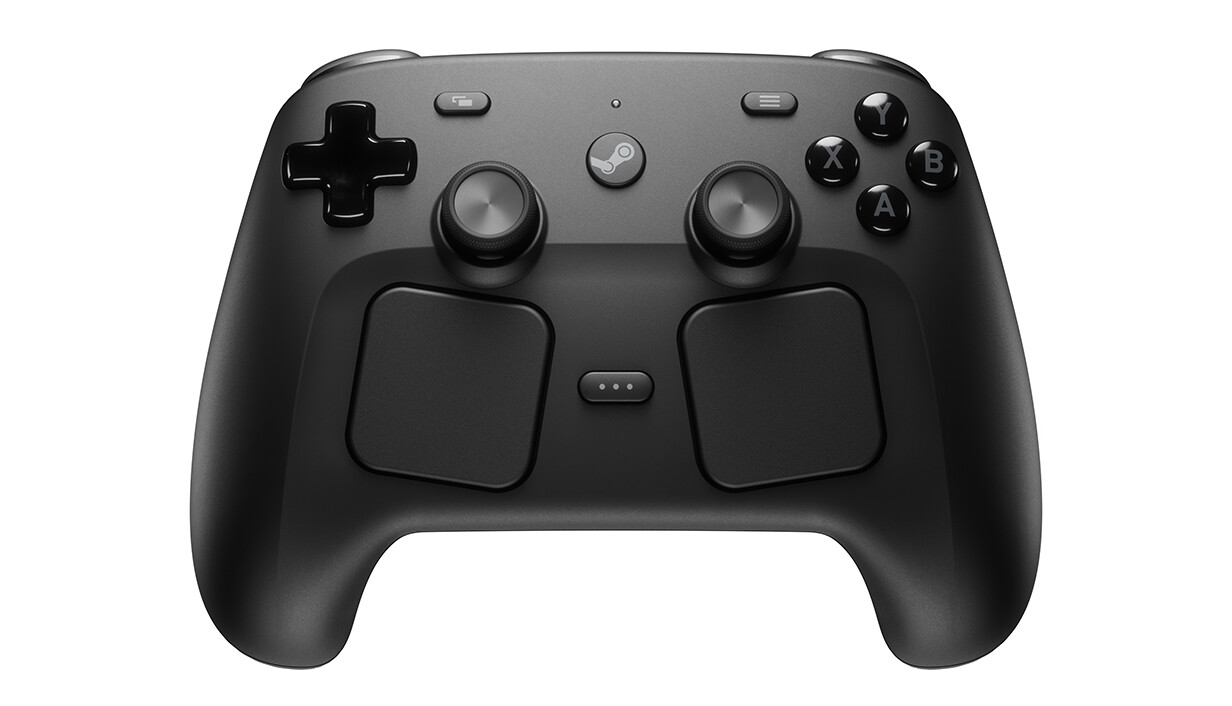
Buy the Steam Controller if your games live on Steam and you play from the couch. This second-generation pad has two full-size sticks above two square trackpads, so it handles like a normal gamepad and can still stand in for a mouse. Skip it if you mostly play outside Steam or want to plug headphones into the controller.
The first Steam Controller, back in 2015, had just one stick and leaned hard on its trackpads. The new one keeps the trackpads, adds the second stick, and joins the Steam Deck, Steam Machine and Steam Frame in Valve's hardware lineup. We haven't tested it ourselves, but two reviews by people who have used it fill in what Valve's specs can't tell you.
At a Glance#
Product : Valve Steam Controller (2026)
Brand : Valve
Best For : Playing a Steam library from the couch on a PC, Steam Deck, Steam Machine or Steam Frame
Connectivity : 2.4GHz via the Steam Controller Puck, Bluetooth, USB-C tethered play
Sold Through : Steam, Valve's online storefront
Key Highlights:
- Two full-size magnetic sticks, so it finally plays like a normal gamepad
- Two square trackpads and a gyro that let it stand in for a mouse from the couch
- Four haptic motors, with rumble in the grips
- The Puck connects it and charges it magnetically, for up to four controllers
- 35+ hours on a charge by Valve's rating, less when a Steam Frame is tracking it
- Works with a PC, Steam Deck, Steam Machine or Steam Frame
Who Should Buy This#
If your library is on Steam and you play from the sofa, this is your pad. It's built for Steam and set up through Steam Input, and because its inputs match a Steam Deck's, it comes with community layouts ready to go. The trackpads and gyro are the big draw. Together they let it stand in for a mouse, in mouse-and-keyboard games and on the desktop.
It's also an easy pick if you own other Valve hardware. It pairs with a Steam Machine without the Puck and can wake the Machine from the couch. With a Steam Frame, it's made for playing your non-VR games on a giant virtual screen, and the headset's cameras can track it by its infrared LEDs.
Skip it if Steam isn't where you play. It needs Steam or the Steam Link app. For games from other stores, Valve recommends adding them to Steam first for the best experience. On an iPhone it can pair over Bluetooth for GeForce Now and still go unrecognised in the game, while the Steam Link app on your home network works seamlessly.
On a Mac, some Steam games won't work with it, because they rely on the game controller framework built into macOS. Valve doesn't support consoles either, though you might get basic functions over Bluetooth. And there's no audio jack on the controller for wired headphones.
Design & Build Quality#
The layout is a full gamepad with extras. You get A, B, X and Y, a D-pad, analog triggers and bumpers on both sides, View and Menu buttons, Steam and QAM buttons, and four assignable grip buttons on the back. The two sticks sit level with each other below the face buttons. The trackpads are smaller than the original's, square, and sit below the sticks, angled slightly inward toward your thumbs. They're pressure-sensitive, and you choose how hard a click takes.
It's light and comfortable to hold. Valve lists the controller at 292 g and 111mm x 159mm x 57mm, and the Puck at 16 g and 50mm x 28mm x 9mm. The face buttons are ordinary membrane buttons, and the triggers use Hall effect sensors. The back buttons sit very low on the inside of the grips, right under your fingers, though the lower pair is fairly easy to press by accident.
If you ever need to open it up, it comes apart with relative ease and only a handful of tools.
Key Features#
Magnetic TMR thumbsticks#
The sticks are the biggest change from the original: there are two of them now, both full-size and both touch-sensitive. They're magnetic TMR sticks, built for better feel, responsiveness and long-term reliability, and they're reliable and responsive in play.
Trackpads, gyro and Grip Sense#
The trackpads let you play mouse-and-keyboard games from the couch. Each one is a 34.5mm square with haptic feedback. For aiming there's a 6-axis gyro, and Grip Sense turns it on and off. Two touch-sensitive areas run along the back of the handles. Valve set it up so holding them switches gyro aiming on and letting go switches it off. You can also map them like any other button. One review reports "higher accuracy across the desktop with gyro controls compared to the trackpads".
Haptics#
There are four haptic motors. Two sit in the trackpads and give your thumbs fine tactile feedback, and two high-output ones in the grips do rumble and other game effects. All four are LRA motors, which Valve built to handle complex waveforms.
The Steam Controller Puck#
The Puck does two jobs. It's a fast, stable 2.4GHz wireless link, pre-paired and plug and play, and it's a charging station the controller snaps onto with a magnet. Valve rates the link at about 8ms end to end, with 4ms polling, measured at 5m. That polling works out to 250 Hz, which one review counts against it for competitive play. One Puck handles up to four controllers and plugs into your PC with the included USB cable.
Bluetooth and USB#
You don't have to use the Puck. The controller also pairs over Bluetooth, which needs version 4.2 at least, and Valve recommends 5.0 or newer. You can play wired over USB-C too. With a Steam Deck, Bluetooth is the way to go if you don't want a cable.
Battery#
Battery life is a strong point. Valve rates the 8.39 Wh Li-ion battery at 35+ hours of play, less when a Steam Frame is tracking the controller. In one review, eight hours of use still left the battery indicator at full.
Where it plays#
It works with any PC or device that runs Steam or the Steam Link app, so Windows and Linux PCs, laptops, tablets and phones all count, with the Mac catch above. It also works with a Steam Deck, a Steam Machine or a Steam Frame. With a Deck, docked or handheld, you get all the same familiar inputs. Valve's store page doesn't say which wireless link the Frame uses.
Technical Specifications#
Valve's figures, some marked subject to change.
| Spec | Detail |
|---|---|
| Thumbsticks | 2x full-size magnetic TMR (tunnelling magneto-resistance), capacitive touch |
| Trackpads | 2x 34.5mm square, haptic, pressure-sensitive click |
| Haptics | 4 motors: 2 LRA (trackpads), 2 high-output LRA (grips) |
| Gyro | 6-axis IMU, Grip Sense enables gyro |
| Grip buttons | 4, assignable |
| Wireless | 2.4GHz via Puck, ~8ms end-to-end, 4ms polling, measured at 5m |
| Puck | Up to 4 controllers, USB-C to PC, USB cable included |
| Bluetooth | 4.2 minimum, 5.0 or higher recommended |
| USB | USB-C tethered play, USB-C charging |
| Battery | 8.39 Wh Li-ion, 35+ hours of gameplay (reduced with Steam Frame tracking) |
| Size | 111mm x 159mm x 57mm (controller), 50mm x 28mm x 9mm (Puck) |
| Weight | 292 g (controller), 16 g (Puck) |
| Works with | PC, laptop, Steam Deck, Steam Machine, Steam Frame |
Pros & Cons#
Pros:
- Two full-size magnetic thumbsticks (TMR) with capacitive touch, plus two haptic trackpads and a 6-axis gyro
- The Puck is both the 2.4GHz wireless transmitter and a magnetic charging station, for up to four controllers
- An 8.39 Wh battery Valve rates at 35+ hours of gameplay
- Pairs to a Steam Machine without the Puck and is trackable by Steam Frame's cameras
- Four assignable grip buttons and four haptic motors
Cons:
- Requires Steam or the Steam Link app
- No audio jack on the controller
- Not compatible with some Steam titles on macOS
- Shorter battery life when a Steam Frame is tracking it
- Membrane face buttons
- A 250 Hz polling rate, which one review counts against it for competitive play
Final Verdict#
Buy it if your games are on Steam and you want a couch controller that also stands in for a mouse. Skip it if you mainly play outside Steam or need an audio jack on the pad.
Our recommendation: buy it on Steam, where Valve sells it directly. Before you order, give Valve's hardware warranty and refund policy a read. Both are linked from its store page.