

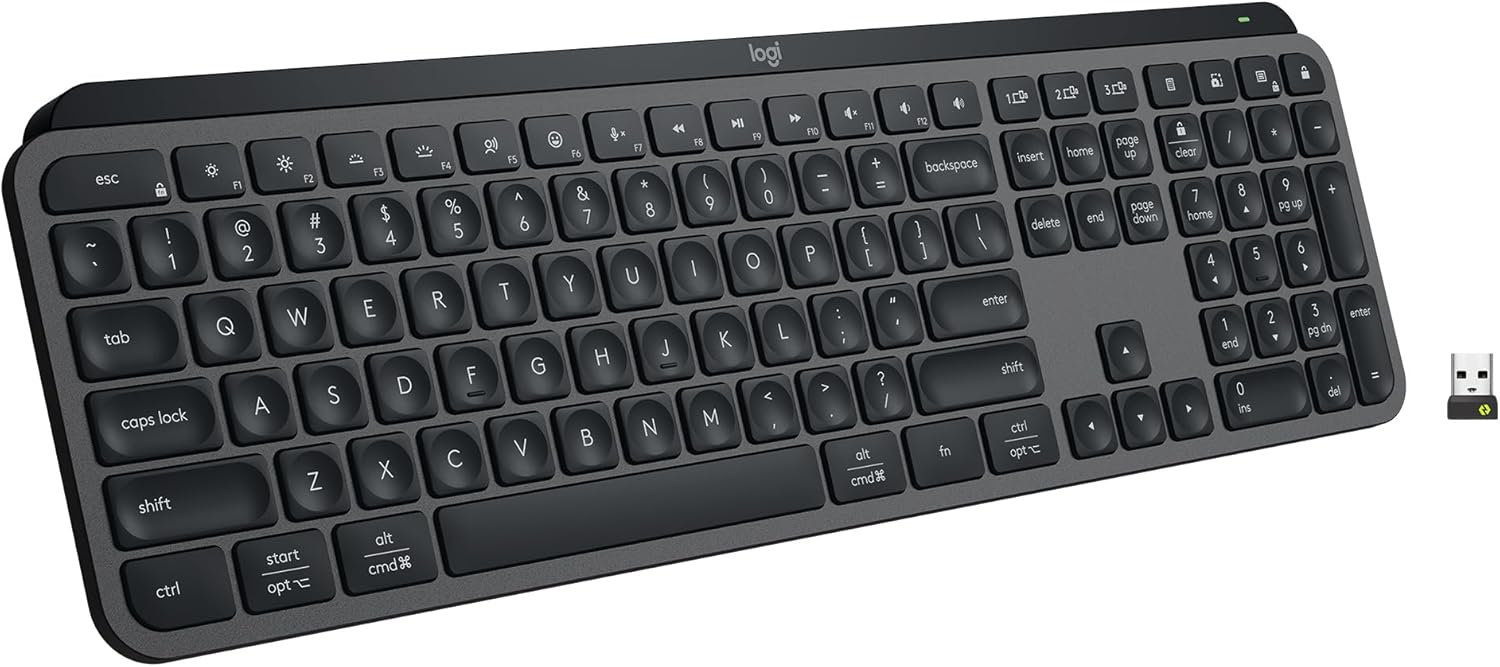
At a Glance#
Product : Logitech MX Keys S
Brand : Logitech
Best For : Professionals, writers, and developers who type for hours and juggle multiple computers
Form Factor : Full-size low-profile wireless keyboard with numpad
Buy Now : View on Amazon
Key Highlights:
- Spherically-dished keys cradle your fingertips for fast, accurate, near-silent typing
- Smart backlight senses your hands approaching and adjusts brightness to the room
- Easy-Switch pairs three devices and Logitech Flow copy-pastes between them
- USB-C rechargeable with up to 10 days of backlit use on a single charge
- Logi Options+ adds Smart Actions macros and dedicated dictation, emoji, and mute keys
Who Should Buy This#
The MX Keys S hits a sweet spot for desk-bound professionals who want laptop-style comfort in a full-size board without sacrificing a numpad. It delivers a refined typing feel, multi-device switching, and deep software customization that cheaper wireless keyboards simply do not offer.
Perfect for:
- Writers and editors who spend six-plus hours a day typing and want quiet, fatigue-free keys
- Developers and analysts who switch between a work laptop and personal desktop all day
- Mac and Windows users who need one keyboard that auto-adapts to both operating systems
- Remote workers who want backlit keys for early mornings without a glaring desk lamp
Design & Build Quality#
The MX Keys S feels like a tool built for serious work. A solid aluminum top plate keeps the chassis rigid with zero deck flex, and the matte graphite finish resists fingerprints far better than glossy rivals. At roughly 810 grams it stays planted on the desk and never slides during fast typing.
The low-profile keycaps sit at a gentle incline that mirrors a laptop, so the transition from your MacBook or ThinkPad feels instant. Rubber feet run the full length of the underside, and the fixed angle is comfortable for most users, though there are no adjustable tilt legs.
Key Features#
Spherically-Dished Quiet Keys#
Each keycap has a subtle 0.2mm concave dish shaped to match your fingertip, so your fingers settle into the center of every key instead of skating off the edge. The result is fewer typos and a typing sound closer to a soft thud than a sharp clack.
In practice this means you can take a video call while typing notes and your colleagues will barely hear the keyboard. The travel is short and crisp, giving you the speed of a laptop with more satisfying feedback.
Proximity-Sensing Smart Backlight#
Hand-proximity sensors light the keys the moment your fingers approach and fade them out seconds after you leave, which conserves battery without you ever touching a button. An ambient light sensor then tunes brightness automatically so the backlight is readable in a dim room and dialed back in daylight.
For early risers and late-night workers, this means you can find the keys in a dark home office without flooding the room with light. Check current availability: View on Amazon
Easy-Switch and Logitech Flow#
Three dedicated Easy-Switch keys let you pair the keyboard with up to three computers and jump between them with a single tap. Connect over Bluetooth Low Energy or the bundled Logi Bolt USB receiver for a rock-solid, low-latency link.
Pair it with a compatible MX mouse and Logitech Flow lets your cursor cross from one machine to another as if they were one desktop. You can even copy text on your work laptop and paste it on your personal PC. That turns a two-computer desk into a single seamless workspace.
Logi Options+ Customization#
The free Logi Options+ app unlocks Smart Actions, letting you trigger multi-step macros from a single key, plus per-application key remapping. Dedicated keys for dictation, emoji insertion, and microphone mute are tuned for modern remote-work habits.
You can set the keyboard to open your meeting app, mute notifications, and launch your notes doc with one keystroke. The customization is genuinely useful, not gimmicky.
All-Day Battery on USB-C#
A built-in rechargeable battery delivers up to 10 days of use with the backlight on, or roughly 5 months with it off. A quick USB-C top-up gets you back to work fast, and you can keep typing while it charges.
This means no AA battery swaps and no surprise dead keyboard mid-deadline. A short USB-C cable is included in the box.
Technical Specifications#
Layout : Full-size with numeric keypad
Key Type : Low-profile scissor switches, spherically-dished caps
Connectivity : Bluetooth Low Energy and Logi Bolt USB receiver (included)
Multi-Device : Easy-Switch for up to 3 devices
Backlighting : Hand-proximity and ambient-light adaptive white backlight
Battery : Rechargeable Li-Po, up to 10 days (backlit) / 5 months (backlight off)
Charging : USB-C, usable while charging
Compatibility : Windows, macOS, Linux, Chrome OS, iPadOS, iOS, Android
Software : Logi Options+ with Smart Actions
Dimensions : 131.6 x 430.2 x 20.5 mm
Weight : 810 g
Build : Aluminum top plate, matte finish
Pros & Cons#
Pros:
- Spherically-dished keys make typing fast, accurate, and remarkably quiet
- Proximity-sensing backlight turns on as your hands approach and adapts to room light
- Easy-Switch and Flow let you control and copy-paste across three computers
- USB-C rechargeable with up to 10 days of backlit use, 5 months with backlight off
- Logi Options+ enables Smart Actions macros and per-app customization
- Solid aluminum top plate resists flex and feels premium on the desk
- Auto-detects Windows or Mac and labels modifier keys for both
Cons:
- Backlight is dimmer than some competing keyboards and washes out in bright sun
- No dedicated storage slot for the Logi Bolt receiver
- Fixed angle with no adjustable tilt legs
- Not ergonomic or split, so it won't relieve serious wrist strain
Final Verdict#
Buy it. The Logitech MX Keys S is the most comfortable full-size wireless keyboard for all-day typing and multi-device workflows, combining quiet refined keys with genuinely useful software.
Our recommendation: Pair it with a compatible MX Master mouse to unlock Logitech Flow and turn your multi-computer desk into one seamless workspace. Get it now: View on Amazon