

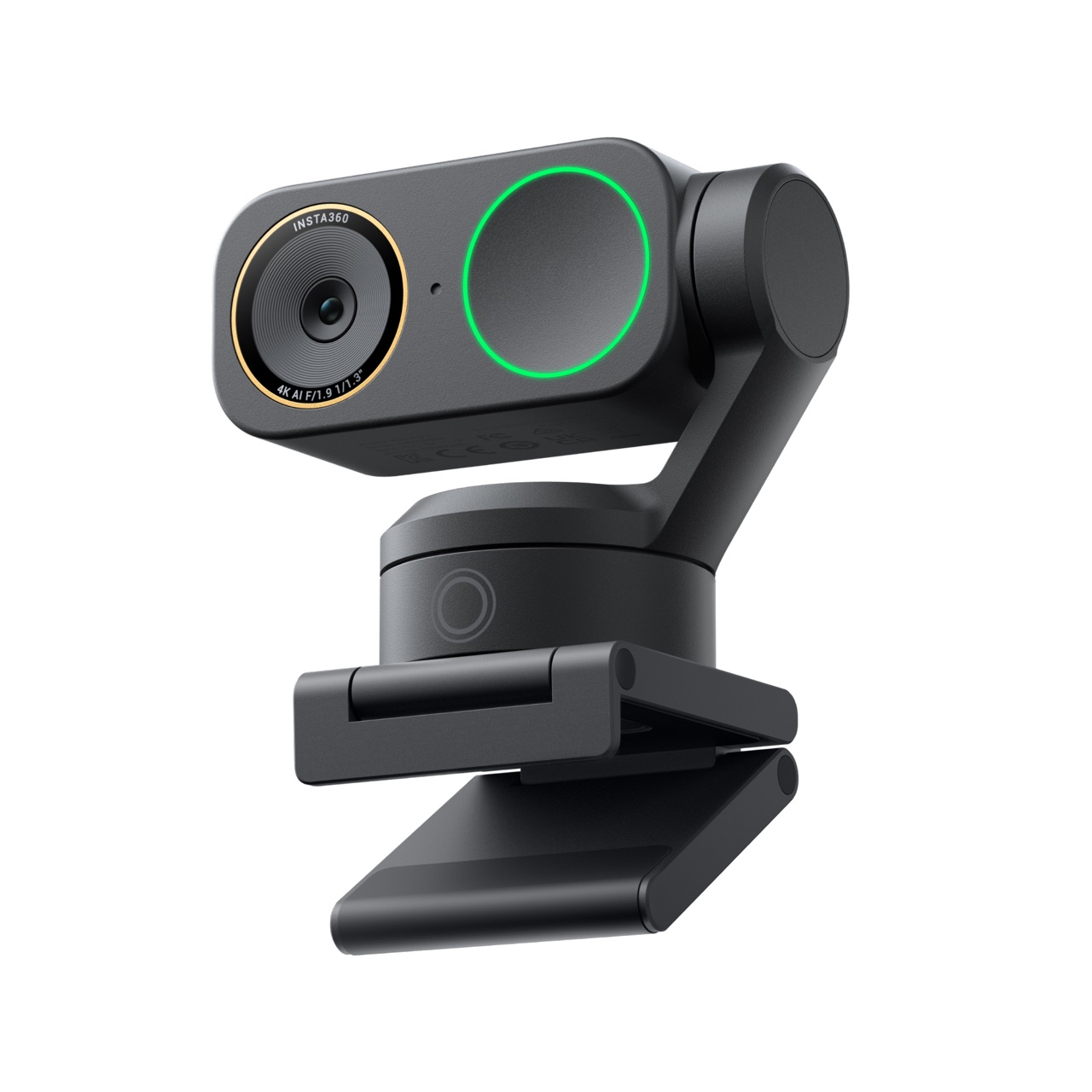
Summary#
The Insta360 Link 2 Pro Standard Bundle is a Graphite Black 4K webcam with a 1/1.3-inch sensor, two-axis gimbal, AI tracking, and directional noise-canceling microphones. It is best for presenters, teachers, and creators who move while speaking and will use its advanced framing tools.
At a Glance#
Product : Insta360 Link 2 Pro Standard Bundle
Brand : Insta360
Best For : Remote presenters, online teachers, product demonstrators, and solo creators who need a webcam to follow movement
Form Factor : Graphite Black motorized 4K webcam with a two-axis gimbal and magnetic monitor mount
Exact Variant : Model CINSABPA Standard Bundle with magnetic mount, four recognition markers, USB-C cable, and USB-C to USB-A adapter
Buy Now : View on Amazon
Key Highlights:
- Large 1/1.3-inch sensor captures more light than the small sensors built into most laptops
- 4K at 30fps or 1080p at 60fps provides a choice between maximum detail and smoother motion
- Two-axis AI tracking physically pans and tilts to keep a moving presenter framed
- Dual microphones with beamforming offer four pickup modes for meetings, teaching, and streaming
- DeskView and Smart Whiteboard modes make demonstrations easier without adding a second camera
Who Should Buy This#
The Insta360 Link 2 Pro makes the strongest case for itself when a conventional fixed webcam cannot cover the way you work. If you teach at a whiteboard, demonstrate products across a desk, present while standing, or move between several points in a room, its motorized gimbal can replace repeated camera adjustments. The 1/1.3-inch sensor also gives the camera a better foundation for dim home offices than a thin laptop lid can accommodate.
This is a premium webcam, and its value depends on using those capabilities. Someone who sits in one well-lit position for occasional calls may be satisfied with a basic fixed 1080p model. The Link 2 Pro is for buyers who see framing, low-light quality, and presentation control as work tools rather than luxuries.
Perfect for:
- Remote professionals who lead client calls or webinars and want polished 4K video with more reliable exposure in mixed office lighting
- Online teachers and trainers who move between a desk and whiteboard and need the camera to follow without an operator
- Solo product creators who switch between face-to-camera segments and overhead desk demonstrations in one compact setup
- Live streamers who want 1080p60 motion, Stream Deck control, and flexible framing without using a mirrorless camera and capture card
The exact bundle matters. This review covers the Graphite Black Link 2 Pro Standard Bundle, not the fixed Link 2C Pro and not the Get-Set Bundle with its extra tripod and carry case. Confirm the selected version on the listing before ordering: View on Amazon
Design & Build Quality#
The Link 2 Pro places a rectangular camera head on a compact two-axis gimbal. Its Graphite Black finish and restrained gold lens ring look more like creator equipment than a generic office peripheral. The camera body measures 71.3 x 58.9 x 38mm and weighs 102.5g without its mount. With the magnetic monitor mount attached, total weight rises to 167.5g.
That mount gives the webcam a stable platform and includes a standard 1/4-inch mounting point for a tripod or other support. A separate tripod is not included in the Standard Bundle. On a conventional monitor, the folding mount should be the simplest choice; on an unusually thick display or a laptop with a very narrow bezel, check that the foot sits securely without covering useful screen area.
The gimbal is the defining physical feature. It provides 282 degrees of horizontal movement and 180 degrees of vertical movement, allowing the lens to follow a presenter instead of merely cropping into a wide static image. Motorized parts inevitably add bulk and another moving component compared with a fixed webcam, so this is less suited to being tossed unprotected into a crowded bag.
Privacy mode is more deliberate than relying on a software indicator. Tilting the camera head downward puts the lens out of view, and the camera can enter its resting position after inactivity. It is not a sliding physical shutter, however. Buyers who specifically want an opaque mechanical cover should recognize that distinction.
Connection is straightforward: the included cable plugs into the camera over USB-C, and an adapter supports computers with USB-A ports. The webcam draws 5V/1A power and sends video over USB 2.0. No battery, wireless pairing, or capture card is required for normal computer use.
Key Features#
A Larger Sensor for Difficult Rooms#
The 1/1.3-inch sensor is unusually large for a webcam. A larger light-gathering area does not eliminate the need for good lighting, but it gives the camera more information to work with when a room is dim or a bright window sits behind the subject. Insta360 pairs it with dual native ISO and HDR to preserve more detail across highlights and shadows.
The lens uses an f/1.9 aperture and a 24mm full-frame-equivalent focal length. Its fixed diagonal field of view is 83.9 degrees, wide enough for a desk setup or a small group without making a single speaker look extremely distant. Autofocus works from 12cm to infinity, which is useful when holding an object near the lens during a demonstration.
Maximum landscape and portrait resolution is 4K at 30, 25, or 24fps. Stepping down to 1080p or 720p unlocks up to 60fps. Choose 4K30 when fine product detail, text, or a clean recorded image matters most. Choose 1080p60 for hand movement, fitness instruction, or streams where fluid motion matters more than extra pixels.
Not every calling platform transmits 4K, and some effects impose their own resolution limits. A 4K source can still produce a clean downsampled image, but buyers should not assume every participant will receive native 4K. The best results come from matching the camera setting to the software, bandwidth, and destination rather than selecting the largest number automatically.
Physical AI Tracking Instead of a Digital Crop#
The two-axis gimbal allows the Link 2 Pro to pan and tilt as its tracking system follows a person or group. This preserves more of the sensor than a fixed camera that creates movement solely by cropping into a wide frame. It is particularly valuable for a teacher walking to a board or a presenter stepping back to show a full product.
Tracking still works best when the camera has a clear view. Fast movement, strong backlight, people crossing in front, or a face displayed on a large screen can challenge any vision-based system. Set reasonable tracking boundaries in the controller software and place the webcam where objects are less likely to interrupt its line of sight.
Gesture control lets a presenter start or stop tracking and adjust framing without returning to the keyboard. The feature is useful when standing several feet from the computer, though deliberate gestures are preferable to casual hand movement. Smartphone control and scene presets provide other ways to change camera angles and recall repeatable configurations.
The 4x digital zoom helps tighten a shot, but it does not create optical detail. Heavy zoom reduces the effective pixels available in the final frame. Start by placing the camera closer and at eye level, then use modest digital zoom for refinement rather than expecting it to replace proper positioning.
DeskView and Smart Whiteboard Modes#
DeskView changes the framing for documents, sketches, unboxings, and small product demonstrations. It gives a solo presenter a practical second perspective without permanently mounting an overhead camera. The gimbal's range makes the transition more natural than physically tilting a fixed webcam each time.
DeskView is most useful after a careful setup. Keep the work surface within the camera's movement range, use even lighting, and avoid glossy materials that reflect the light source. The wide 24mm-equivalent lens can include more desk than expected, so clear personal paperwork from the surrounding area before a call or recording.
Smart Whiteboard uses the four recognition markers included in the Standard Bundle to identify and correct the board area. This can make written material easier to follow for remote students. Place the markers at the corners, keep them visible, and light the board from angles that minimize glare. The mode assists framing; it cannot rescue faint markers or illegible handwriting.
Virtual backgrounds and natural bokeh are available through Insta360's software workflow. Software effects can require more processing power and may reduce the maximum supported resolution. A tidy background and physical separation from the wall remain the most dependable starting point, with effects added only when they improve the presentation.
Four Audio Pickup Modes#
The camera contains two microphones, combining omnidirectional and directional pickup with AI noise cancellation and beamforming. Four audio modes—Standard, Wide, Focus, and Original—let the microphone behavior match the room rather than forcing every user into one aggressive filter.
Focus mode is the logical starting point for a solo speaker because it emphasizes sound from the camera's direction. Wide mode makes more sense for a small group around a table. Original mode is useful when processing artifacts are more distracting than ambient sound, while Standard provides a general-purpose balance.
Built-in webcam audio is convenient, especially for travel or uncluttered workspaces, but distance still matters. A microphone mounted above a monitor will capture more room sound than a mic placed near the speaker. Streamers, musicians, and presenters in echoing spaces may still prefer a dedicated USB or wireless microphone. The Link 2 Pro's improved audio is a capable fallback, not a replacement for every specialized setup.
Controller Software and Workflow Control#
The Link Controller software exposes tracking behavior, image adjustments, scene presets, framing tools, and effects. Stream Deck integration is particularly useful for creators who want camera actions on physical buttons. Once several views are saved, a solo presenter can move from a head-and-shoulders shot to DeskView without navigating menus on screen.
This software depth is both an advantage and a responsibility. Update the controller and webcam firmware before important work, then test the exact meeting or streaming application you plan to use. Virtual camera features can have different frame-rate and resolution limits from the webcam's direct UVC feed.
For critical calls, create a simple default scene with conservative exposure, stable white balance, and tracking disabled until needed. Automatic tools are most effective when they solve a known problem. Leaving every effect active can produce distracting framing changes or place unnecessary load on the computer.
The Link 2 Pro works with major conferencing and streaming platforms when selected as a camera source. Platform compression, account limits, and virtual-camera restrictions remain outside the webcam's control. Run a local recording before a webinar to confirm image, audio, framing, and synchronization under the same settings.
Setup and Daily Use#
Mount the camera near eye level and connect it directly to a reliable USB port. Avoid an overloaded unpowered hub during initial setup. Install the current Link Controller, update firmware, and check that both the operating system and target application recognize the webcam and microphone.
Next, frame the widest position you expect to use. Walk through the presentation area and watch how tracking responds near the edges. Set boundaries that prevent the camera from following you toward a doorway, secondary screen, or irrelevant part of the room. Save separate scenes for seated calls, standing presentations, and desk demonstrations.
Lighting remains the highest-value improvement. Face a window or soft light when possible rather than placing it directly behind you. HDR can balance difficult exposure, but it cannot make a dark face look as natural as a modest front light. Wipe the lens occasionally; a fingerprint on a small webcam lens softens highlights and reduces contrast more than many users realize.
Choose an audio mode only after listening to a short recording. Noise cancellation that sounds effective through laptop speakers can make a voice seem thin through headphones. If the room echoes, moving closer to the camera or adding soft furnishings may improve speech more than increasing software filtering.
Before travel, tilt the camera into its privacy position and protect the gimbal from pressure. The Standard Bundle does not include a carry case. A small fitted pouch with enough room around the camera head is safer than dropping the exposed mechanism beside chargers and cables.
If the Link 2 Pro's moving-camera workflow fits your work, the Standard Bundle provides the necessary camera, mount, markers, cable, and adapter without charging for a tripod and case you may not need. Check the exact Graphite Black configuration here: View on Amazon
Technical Specifications#
Exact Model and Variant : Insta360 Link 2 Pro CINSABPA Standard Bundle, Graphite Black
Image Sensor : 1/1.3-inch sensor with dual native ISO
Maximum Video Resolution : 4K at 30, 25, or 24fps in landscape or portrait orientation
High-Frame-Rate Video : 1080p or 720p at up to 60fps
Video Formats : H.264 and MJPEG, with mode-dependent restrictions
Lens : f/1.9 aperture, 24mm full-frame-equivalent focal length
Field of View : 83.9-degree diagonal and 71.4-degree horizontal fixed field of view
Focus and Zoom : Autofocus from 12cm to infinity with up to 4x digital zoom
Gimbal Movement : Two-axis gimbal with 282-degree horizontal and 180-degree vertical range
Microphones : Two microphones with AI noise cancellation, beamforming, and four pickup modes
Connection and Power : USB-C using USB 2.0 data; 5V/1A input; USB-C to USB-A adapter included
Dimensions : 71.3 x 58.9 x 38mm (2.81 x 2.32 x 1.50 in)
Weight : 102.5g (3.6oz) camera only; 167.5g (5.9oz) with magnetic mount
Mounting : Magnetic monitor mount with standard 1/4-inch mounting point
Operating Temperature : 32°F to 104°F (0°C to 40°C); not waterproof
Standard Bundle Contents : Link 2 Pro, magnetic mount, four recognition markers, USB-C cable, and USB-C to USB-A adapter
Amazon ASIN : B0G3T1QKWL
Pros & Cons#
Pros:
- Strong low-light foundation: The 1/1.3-inch sensor, f/1.9 lens, dual native ISO, and HDR address difficult home-office lighting
- Useful movement tracking: The two-axis gimbal physically follows presenters instead of relying only on a digital crop
- Flexible capture modes: 4K30 favors detail while 1080p60 handles faster movement more smoothly
- Presentation-friendly tools: DeskView, Smart Whiteboard, gesture control, and scene presets support teaching and demonstrations
- More capable built-in audio: Dual microphones provide beamforming, noise cancellation, and four pickup patterns
- Practical mounting: The magnetic display mount also includes a 1/4-inch point for alternate supports
- Direct workflow control: Smartphone control and Stream Deck integration reduce trips back to the computer
Cons:
- Premium features can be unnecessary: Seated callers in good light may not benefit enough from the gimbal and software tools
- No physical sliding shutter: Privacy mode points the lens downward rather than covering it with an opaque barrier
- Standard Bundle lacks travel protection: A carry case and mini tripod are reserved for another bundle
- Digital zoom has limits: The 4x zoom crops the image and cannot add the detail of an optical lens
- Software modes vary in output: Some effects and virtual-camera features restrict resolution or frame rate
Final Verdict#
Buy it. The Insta360 Link 2 Pro Standard Bundle is a compelling premium webcam for people whose presentations extend beyond one seated position, combining a large sensor, physical AI tracking, flexible audio, and genuinely useful demonstration modes.
Its biggest strengths work together. The gimbal follows movement, autofocus handles objects brought near the lens, DeskView covers a work surface, and recognition markers help frame a whiteboard. The larger sensor improves the image foundation, while the controller turns those hardware capabilities into repeatable scenes.
The trade-off is simple: buyers pay for movement and workflow flexibility. If every call happens from the same chair, a fixed webcam and a good light may be the smarter purchase. If your work involves teaching, presenting, streaming, or showing physical products, the Link 2 Pro can remove enough camera friction to justify its complexity.
Our recommendation: Choose the Graphite Black Standard Bundle if you already own a tripod or plan to keep the camera on one monitor. Add a protective case separately if it will travel, and confirm model CINSABPA and ASIN B0G3T1QKWL before checkout: View on Amazon