

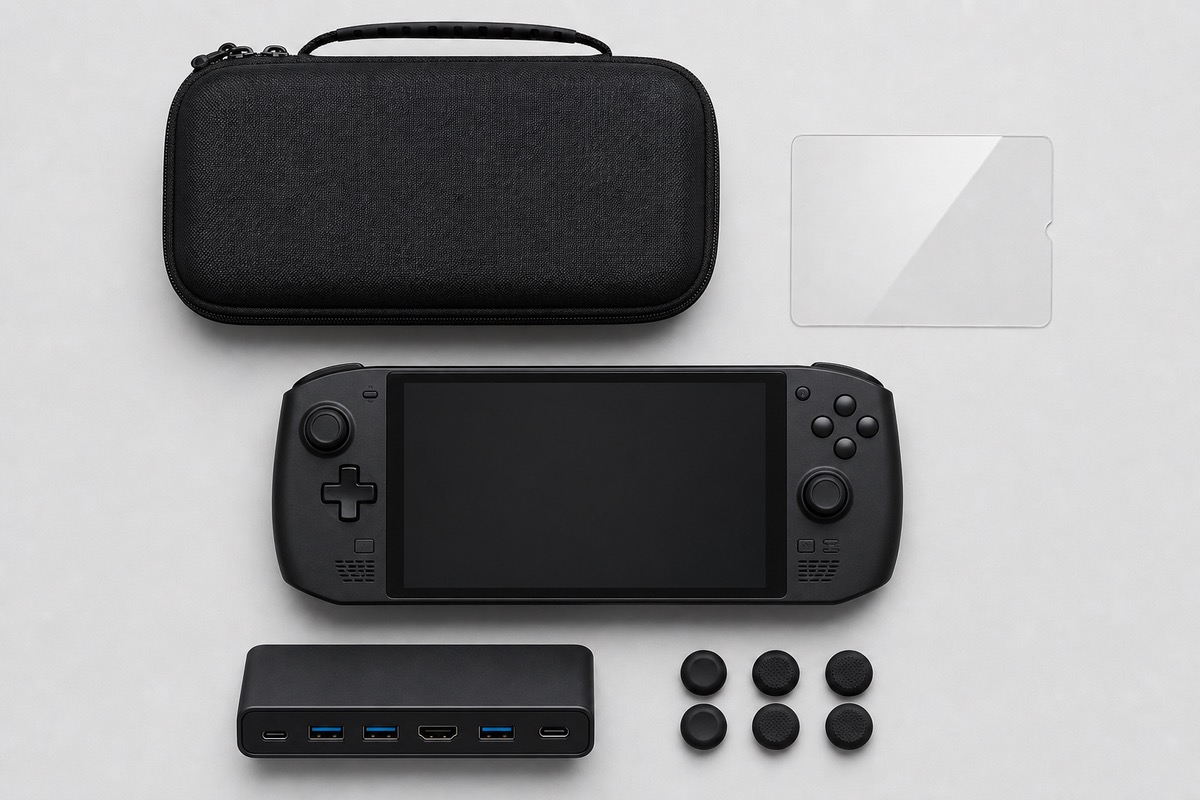
At a Glance#
Best all-in-one starter kit : View on Amazon
Best dedicated carrying case : View on Amazon
Best dock for TV and desktop play : View on Amazon
Start with the kit if you want protection sorted in one buy, add the dedicated case if you travel with the charger and dock, and grab the dock when you want to play on a monitor or TV. Check the live price on each before you commit.
Why Accessorize the Ally X At All#
A new handheld goes straight into a bag, onto a coffee table, and between rooms — which is exactly how screens get scratched, thumbsticks get bent, and consoles pick up dents. The right accessories head that off: glass over the screen, a moulded shell around the console, and a dock so you can drop into big-screen play without unplugging cables every time. None of it is expensive relative to the handheld, and each piece pays off the first time it saves the device.
The Best Accessories to Buy#
CoBak 3-in-1 Kit — best all-in-one : View on Amazon is the fastest way to cover the basics in one purchase: a hard EVA case moulded to the Ally and Ally X, two 9H tempered glass screen protectors, and four thumb grip caps. It also stores cables, earphones, and up to 22 SD or game cards. See our full CoBak kit review.
JSAUX Double-Decker Case — best dedicated case : View on Amazon is the pick if you travel with more than the console. Built only for the ROG Xbox Ally and Ally X, its dual-layer design holds the handheld up top and the original charger, stand, HDMI cable, and earphones below, with raised zones protecting the joysticks and a shoulder strap for carry.
JSAUX 6-in-1 Dock (HB0609) — best dock : View on Amazon turns the Ally X into a console on your TV: HDMI 2.1 at 4K 120Hz, Gigabit Ethernet, USB-A and USB-C 3.2 Gen 1 ports, and 100W passthrough charging. Unlike some handheld docks, this one explicitly supports the ROG Xbox Ally X. If you also own a Steam Deck, see our JSAUX 6-in-1 Steam Deck dock review.
Which Should You Buy First?#
If you buy one thing, make it the CoBak kit — it protects the screen, shell, and sticks together. Add the JSAUX Double-Decker case if you carry the charger and cables everywhere, and the JSAUX dock when you want to play on the big screen. For power on the go, pair any of them with a good battery — see our best power banks for handheld gaming — and for space, our best microSD cards for the ROG Xbox Ally.
Watch the Compatibility Line#
The one thing to get right: the ROG Xbox Ally X is newer than the original ROG Ally, and not every "ROG Ally" accessory fits it. The picks here are chosen because they list the ROG Xbox Ally X (2025) as supported — the CoBak case is moulded for it, the JSAUX case is built only for the Ally and Ally X, and the JSAUX HB0609 dock names the Xbox Ally X specifically. Always confirm your exact model on the listing before buying.
Pros & Cons#
Pros:
- Covers the three real needs — screen, shell, and big-screen play
- Every pick lists the ROG Xbox Ally X (2025) as supported
- The all-in-one kit protects screen, case, and sticks in one buy
- The dock adds 4K 120Hz output and 100W charging for docked sessions
- All three are readily available on Amazon
Cons:
- Buying all three costs more than a single accessory
- Some "ROG Ally" accessories do not fit the newer Xbox Ally X — check the listing
- The dock needs your own USB-C charger for full-speed power
Final Verdict#
Start with protection, then add capability. The CoBak 3-in-1 kit (View on Amazon) is the best first buy — case, screen protectors, and grips together. Add the JSAUX Double-Decker case (View on Amazon) if you travel with the charger and cables, and the JSAUX 6-in-1 dock (View on Amazon) for TV and desktop play. Whatever you choose, confirm it lists the ROG Xbox Ally X on the product page.
Building out the rest of your setup? See our best power banks for handheld gaming, the best microSD cards for the ROG Xbox Ally (or, for the 2026 ROG Xbox Ally X20 and its microSD Express reader, our roundup of microSD Express cards for the ROG Xbox Ally X20), and the tomtoc Steam Deck & ROG Ally carrying case review.
FAQ#
Q: Do regular ROG Ally accessories fit the ROG Xbox Ally X? A: Not always. The ROG Xbox Ally X (2025) differs from the original ROG Ally, so some cases and docks do not fit. Every pick here lists the Xbox Ally X as supported — always confirm your exact model on the listing.
Q: What is the single most important accessory to buy first? A: A protection kit. The CoBak 3-in-1 covers the screen, shell, and thumbsticks in one purchase, which addresses the most common ways a handheld gets damaged.
Q: Do I need a dock if I only play handheld? A: No. A dock is only useful if you want to play on a TV or monitor. If you always play handheld, prioritize a case and screen protection instead.
Q: Does the dock come with a charger? A: No. The JSAUX HB0609 passes power through to the handheld but you supply your own USB-C charger; a 100W unit is recommended for full-speed charging.