

At a Glance#
Product : Logitech Brio 505 Business Webcam
Brand : Logitech
Best For : Remote professionals, hybrid teams, and home-office users who want a dependable 1080p webcam with better framing and voice pickup than a built-in laptop camera
Form Factor : USB-C plug-and-play webcam with integrated privacy shutter and monitor mount
Exact Variant : Graphite TAA-compliant model, Logitech SKU 960-001522
Buy Now : View on Amazon
Key Highlights:
- Full HD 1080p video: Delivers a noticeably sharper and more polished call image than the fuzzy, low-contrast cameras built into most laptops
- RightLight 4 with HDR: Adjusts exposure in dim offices and bright backlit rooms so faces stay usable instead of disappearing into shadow
- Auto-framing support: Keeps you centered if you shift in your chair or stand to explain something during a call
- Dual beamforming mics: Focuses on your voice better than the thin, echo-prone microphones in many notebooks
- Show Mode and privacy shutter: Lets you tilt down to share desk work, then close the camera instantly when the meeting ends
Who Should Buy This#
The Brio 505 is at its best when your webcam is not just a checkbox for occasional calls but a tool you rely on several times a week. It solves the most common laptop-camera problems in one step: bad exposure, weak microphones, awkward framing, and the lack of a clean way to show something on your desk. It is not a creator webcam chasing 4K bragging rights. It is a practical, polished meeting camera for people who want fewer excuses and less fiddling before they join a call.
Perfect for:
- Remote professionals who spend hours in Teams, Zoom, or Google Meet and want clearer image quality without buying a full streaming setup
- Hybrid employees who move between home and office desks and need a webcam that works fast with a simple USB-C connection
- Managers and client-facing staff who present frequently and benefit from automatic framing, better voice pickup, and a more professional image
- Teachers, trainers, and demo-heavy users who will actually use Show Mode to point the camera at notes, sketches, or physical products on a desk
If you want the simplest way to upgrade your work calls without jumping to a bulkier 4K model, check the current listing here: View on Amazon
Design & Build Quality#
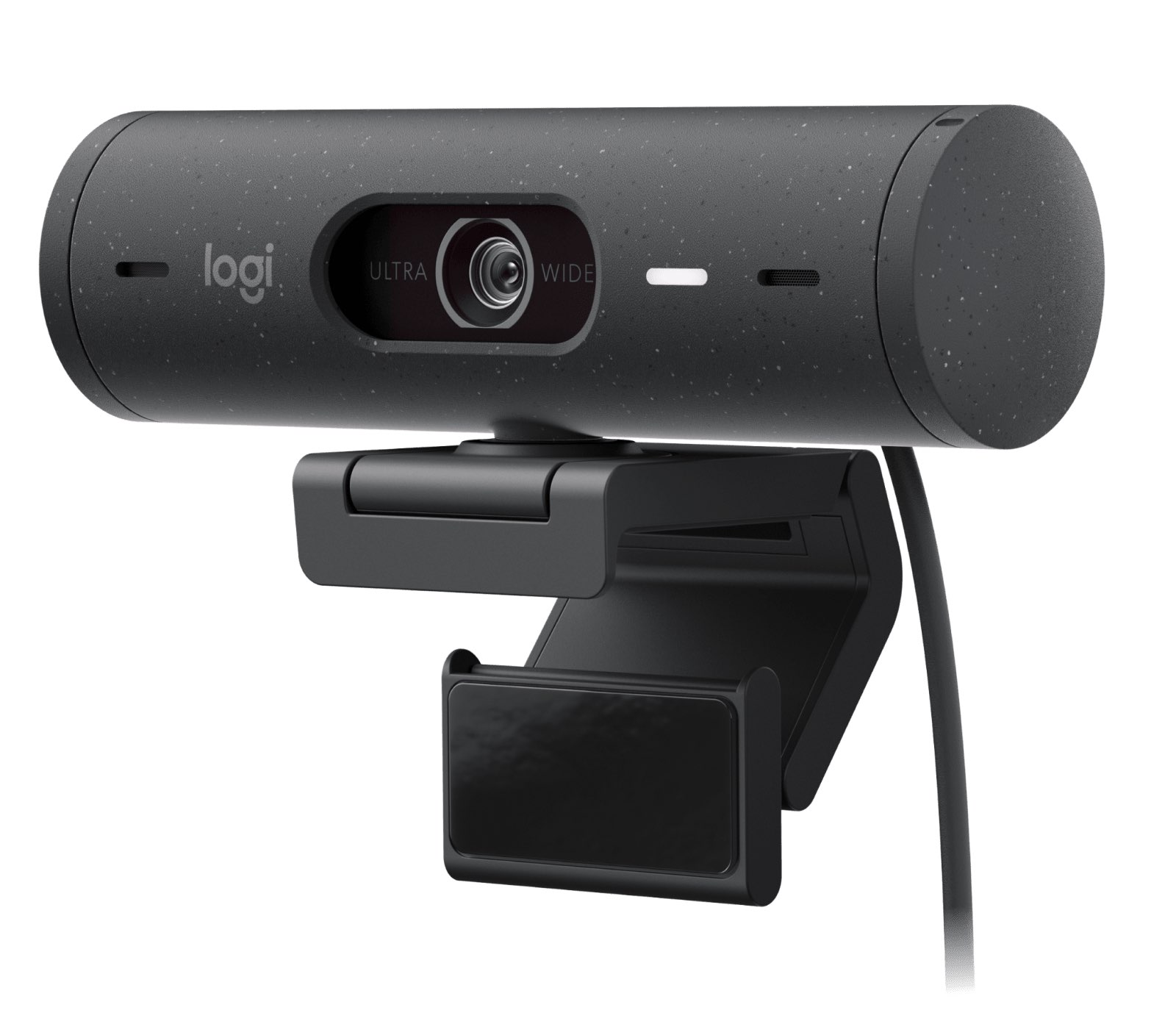
The Brio 505 looks more deliberate than the utilitarian black plastic bar that most business webcams still resemble. The camera body is a rounded cylinder that sits on a compact mount, and the Graphite finish helps it disappear on a monitor instead of calling attention to itself. It feels like something designed to live permanently on a desk, not a temporary accessory you unplug after every meeting.
The size is practical. Logitech lists the webcam itself at 110 mm wide, 31.5 mm high and 31.5 mm deep, the webcam with its mount at 110 x 51.5 x 45 mm, and the mounting clip alone at 45.8 x 25 x 65.1 mm and 40 g. That keeps it compact enough for a laptop or monitor without looking toy-like. Total weight is 121 g including the mount clip and cable, so it sits securely without feeling heavy or awkward on thinner displays.
The included mount matters more than it sounds. A mediocre webcam can be let down by a wobbly clip that shifts every time you adjust the lid. Logitech describes it as a detachable universal mounting clip that fits laptops, LCD displays, or monitors, and it is what makes the Show Mode tilt-down trick workable. If you often reposition your setup or share a desk, that removability becomes part of the value.
Then there is the privacy shutter, which is one of those small features that quietly improves daily use. Software mute icons are fine, but a physical shutter removes doubt. Logitech's description is exact: a simple dial on the side hides the lens when it is not in use. That kind of direct control is reassuring if your camera stays connected all day.
Key Features#
RightLight 4 Does More for Call Quality Than Extra Resolution Often Does#
The Brio 505 tops out at 1080p rather than 4K, but for most work calls that is the right trade. Meeting platforms compress heavily, and what people usually notice first is not missing detail. It is whether your face is too dark, too blown out, or too muddy to look natural. That is why Logitech’s RightLight 4 with HDR is such a meaningful feature here.
On the official product page, Logitech positions the Brio 505 as a camera that adjusts to poor lighting so users look natural. That is exactly the real-world problem most home offices have. A laptop camera can look acceptable in evenly lit daylight, then collapse when you sit near a window, work before sunrise, or take an afternoon call with mixed room lighting. The Brio 505 is built to smooth over those everyday conditions instead of expecting studio lights.
For buyers who work from improvised spaces such as kitchen tables, spare bedrooms, or shared offices, that matters more than spec-sheet theater. A camera that keeps exposure under control in ordinary rooms is more useful than one that promises huge resolution but still makes you look underlit and washed out. The Brio 505 is trying to make meetings dependable, and RightLight 4 is a big reason it succeeds.
The 1080p Image Is Tuned for Meetings, Not for Vanity Specs#
Logitech lists two main video modes: 1080p at 30 fps and 720p at 60 fps. For normal meetings, 1080p at 30 fps is the clear default. It gives you enough sharpness for a clean face image, good text legibility when you lean in, and a more polished look than most integrated laptop cameras.
The company also calls out AI-based face image correction, which fits the product’s purpose. This is not trying to replace a creator camera for YouTube production. It is trying to make sure people see you clearly on calls, and that framing, facial clarity, and exposure stay consistent. For work, that is the right priority.
If your job includes lots of motion, quick hand gestures, or demo work, the 720p/60 mode can help motion look smoother. Most buyers will still leave it at 1080p because meetings reward clarity over cinematic frame rates. The bigger win is that the Brio 505 gives you a strong baseline image without requiring extra tuning every time you open a meeting app.
Auto-Framing Helps More Than You Think if You Actually Move During Calls#
Many webcam features sound useful in theory but do not change the day-to-day experience. Auto-framing is not one of them. If you shift in your chair, roll a little to one side, stand up to whiteboard something, or lean back while explaining an idea, staying centered keeps the call feeling calmer and more professional.
The Brio 505 supports auto-framing — Logitech's name for it is RightSight Auto Framing — and it pairs that with a flexible field of view. Logitech lists diagonal field-of-view options of 90, 78, and 65 degrees plus 4x digital zoom. That means you can decide whether you want a wider shot for a roomier feel or a tighter crop that cuts out background clutter.
Read Logitech's footnotes before you count on it, though. RightSight Auto Framing, Show Mode, the field-of-view switching, and the digital zoom all require Logi Tune, and Logitech states that RightSight Auto Framing is not available on computers with ARM processors. Logi Tune itself is not available on ChromeOS at all, so on a Chromebook you get the camera and the certification but none of the software-driven extras.
This flexibility is especially useful in home offices where the background is rarely perfect. A wider shot can include too much shelf, hallway, or doorframe. A tighter setting helps you look more intentional without needing to rearrange the whole room. It is a simple way to get a cleaner call image from the same desk.
Auto-framing is also one of the strongest arguments for choosing this over a cheaper basic webcam. Plenty of lower-tier cameras can show your face. Fewer make it easier to move naturally without drifting out of frame or constantly adjusting your screen angle.
Dual Beamforming Mics Make the Whole Setup Feel More Complete#
A webcam with good video and weak audio is still a mediocre conferencing tool. Logitech makes a point of giving the Brio 505 dual beamforming mics, and the product page also emphasizes that they filter background noise so your voice comes through more clearly.
That matters because plenty of buyers will use this camera without a headset, at least part of the time. Maybe you are jumping into a quick internal meeting, taking a casual sync from a standing desk, or working in a room where wearing headphones all day feels excessive. In those situations, the webcam needs to pull its own weight on sound.
No webcam mic will replace a dedicated podcast or broadcast microphone, and it should not be judged by that standard. The question is whether it improves on the hollow, distant sound that often comes from laptop mics. The Brio 505 clearly aims to do that, and the dual beamforming setup is a meaningful part of the package rather than an afterthought.
Logitech rates mic range up to 4 feet, which is sensible for normal desk use. Stay within that range and you get the benefit the product is built around: a cleaner voice pickup that feels more intentional than shouting at a laptop from across the room.
Show Mode Is the Feature That Separates It From Generic Office Webcams#
The most distinctive feature here is Show Mode. Logitech built the Brio 505 so you can tilt the camera down and present objects on your desk, which is surprisingly useful if your work involves sketching, annotating, reviewing physical samples, or walking someone through a handwritten process.
This is the kind of feature many buyers will ignore until they need it once, then wonder why every webcam does not have it. If you teach remotely, review printed documents, explain rough concepts on paper, or share small products on calls, Show Mode can remove a lot of friction. It keeps you from balancing a laptop awkwardly or switching to a second device just to point a camera downward.
The mount is part of what makes this practical. The clip is detachable and fits laptops, LCD displays, or monitors. That sounds minor, but it is the difference between a feature you actually use and one that feels annoying every time you try it.
Combined with the privacy shutter, Show Mode makes the Brio 505 feel thoughtfully designed around actual work habits instead of just raw camera specs. It is trying to help you communicate better, not merely look sharper.
Setup and Daily Use#
Setup is straightforward. The Brio 505 uses USB-C plug-and-play connectivity with an attached 1.5 m (5 ft) cable, so most users can connect it and start working immediately; USB-A is possible only with a third-party adapter, which Logitech does not include. Logitech's product page lists compatibility with Windows 8 or later (8.1 or higher for resolutions above 1080p), macOS 10.10 or later, and ChromeOS, and the camera is certified for Microsoft Teams, Zoom, Google Meet, and Works With Chromebook. It carries a 3-year limited hardware warranty.
That broad compatibility is important because the best work webcam is often the one that creates the fewest support tickets. If you switch between a work laptop, home Mac, and Chromebook, or your organization standardizes on one meeting platform but still encounters others, the Brio 505 is built for that reality.
For best results, mount it at eye level, close enough that the 65- or 78-degree view can frame you tightly without forcing a digital crop. If your room is cluttered, a narrower field of view usually looks more professional. If you share physical materials often, keep a clean patch of desk under the camera so Show Mode is immediately usable.
The one caveat is that the advanced features rely on Logi Tune. That is not unusual, but it is worth knowing before you buy. The core camera works as a normal plug-and-play webcam at 1080p with RightLight 4 and the mics doing their job, while Show Mode, RightSight Auto Framing, the field-of-view switching, and the digital zoom all sit behind the app — which means ChromeOS users and ARM-based machines do not get the full list.
Technical Specifications#
Exact Variant : Logitech Brio 505 Graphite TAA-compliant model, SKU 960-001522
Maximum Video Resolution : Full HD 1080p at 30 fps (1920 x 1080)
Alternate Video Mode : HD 720p at 60 fps (1280 x 720)
Camera Sensor Rating : 4 MP
Field of View : 90° / 78° / 65° diagonal options
Zoom : 4x digital zoom
Focus : Autofocus
Lens : Glass lens
Microphones : Dual noise-reducing beamforming mics, listed as a stereo microphone
Mic Range : Up to 4 ft (1.22 m)
Connectivity : USB-C plug-and-play; USB-A only with a third-party adapter, not included
Privacy : Integrated privacy shutter, operated by a dial on the side
Light Correction : RightLight 4 with HDR, plus AI-based face image correction
Software-dependent features : Show Mode, RightSight Auto Framing, field-of-view switching and digital zoom all require Logi Tune. Auto framing is unavailable on ARM processors; Logi Tune is unavailable on ChromeOS
Cable Length : 1.5 m (5 ft) attached cable
Dimensions : Webcam: 110 x 31.5 x 31.5 mm. Webcam with mount: 110 x 51.5 x 45 mm. Mounting clip alone: 45.8 x 25 x 65.1 mm, 40 g
Weight : 121 g including mount clip and cable
Operating Systems : Windows 8 or later (8.1+ above 1080p), macOS 10.10 or later, ChromeOS
Warranty : 3-year limited hardware warranty
Pros & Cons#
Pros:
- RightLight 4 with HDR handles difficult office lighting better than most built-in laptop cameras
- 1080p image quality is crisp enough for daily meetings without the complexity of a 4K setup
- Auto-framing and adjustable field of view make it easier to stay centered and cut background clutter
- Dual beamforming mics give casual headset-free calls a cleaner, more professional sound
- Show Mode is genuinely useful for desk demos, notes, sketches, and training sessions
- Integrated privacy shutter adds a fast, unambiguous hardware privacy control
Cons:
- It is a meeting-first webcam, so buyers chasing creator-grade 4K detail should look higher up the market
- Show Mode, auto framing, field-of-view switching and zoom all require Logi Tune rather than working out of the box
- Logitech states auto framing is unavailable on ARM-processor computers, and Logi Tune is unavailable on ChromeOS entirely
- The attached cable keeps setup simple but gives you less flexibility than a detachable cable if your desk layout changes often
Final Verdict#
Buy it. The Logitech Brio 505 gets the fundamentals of modern work calls right: clean 1080p video, stronger light correction, useful framing tools, better built-in audio, and a physical privacy shutter. It feels like an upgrade designed by people who understand how remote meetings actually go wrong.
For buyers who spend a large part of the week on video calls, the Brio 505 is easier to justify than a spec-heavier camera that adds complexity without improving day-to-day meetings. If your priority is dependable hybrid-work performance rather than creator vanity metrics, this is the smarter pick. Check the current listing here: View on Amazon